
Your AI analyst, built into every page
How It Works
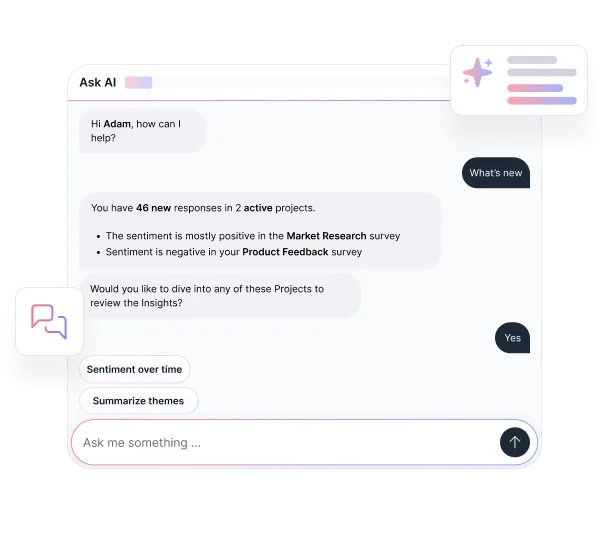
The Ask AI sidebar appears throughout the platform, automatically recognizing which project or page you're viewing and suggesting relevant prompts based on your current context.
Ask questions in plain language about a single project or across all your surveys and receive instant answers backed by your actual response data. From trend analysis and sentiment breakdowns to data comparisons and visualizations, the conversational AI sidebar lets you explore your data the way you think, not the way a report builder expects you to.
You can also click "What's new?" at any time to get a summary of unread insights and responses across all your active projects.
Key Benefits
Discover what the AI chat sidebar can do for your research workflow.

Context-Aware Prompts on Every Page
The AI feedback assistant reads your current location in the platform and pre-loads suggested questions relevant to what you're viewing, whether that's a specific project, your analytics tab, or your full project dashboard.
.avif)
Query Across All Projects at Once
Ask questions that span multiple surveys simultaneously. Identify patterns, compare results between projects, or track how sentiment has shifted over time, all through a single conversation without touching a spreadsheet.
.avif)
Generate Charts, Tables, and Graphs on Demand
Request a visualization and the AI insight generator creates it inline: bar charts, comparison tables, trend graphs, viewable directly in the sidebar and exportable for presentations or reports.
.avif)
Summarize Everything With "What's New?"
Get an instant digest of all unread insights and responses across your projects with a single prompt. The AI survey assistant compiles counts, themes, and last activity dates so you never fall behind on incoming feedback.
.avif)
Explore Themes and Drill Into Responses
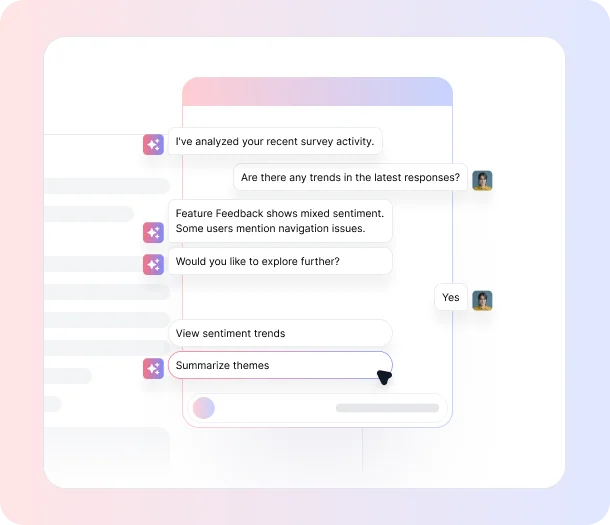
Go deeper on any insight by asking follow-up questions in the same conversation. The real-time AI suggestions surface supporting responses, highlight sentiment shifts, and connect you directly to the conversations behind each data point.
Ready to stop digging through your data?
See what customers say about our AI user testing platform





FAQs
The AI chat sidebar is context-aware and recognizes which project, analytics view, or section you're currently viewing, then automatically suggests relevant prompts based on that context. You don't need to specify what you're analyzing; it already knows.
Yes. From your main projects dashboard, the Ask AI sidebar can analyze patterns across all your surveys at once. Ask comparative questions, track sentiment across different project types, or identify which programs are generating the most actionable feedback.
Anything about your data in natural language: trend analysis, sentiment evolution, theme exploration, response comparisons, task prioritization, and more. The AI data interpretation tool understands business context and responds with answers grounded in your actual project data.
Yes. Request a chart, table, or graph in plain language and the AI will generate it directly within the sidebar. Visualizations can be viewed in-app and exported for external sharing or stakeholder presentations.
Clicking "What's new?" triggers the AI for instant feedback insights to compile a summary of all unread insights and responses across your projects, showing you which surveys have new activity, how many insights are waiting, and when the last insight was recorded.
Yes. A microphone option is available within the Ask AI sidebar, allowing you to ask questions by speaking rather than typing, which is useful when you're reviewing data quickly or working hands-free.
The AI chat sidebar is available within TheySaid. For specific plan details and feature availability, visit our pricing page or contact our team.
Your data has answers.
Ask AI to find them.
Query your feedback in plain English, generate visualizations on demand, and get instant insights across every project without leaving the platform.


TheySaid User testing recommends questions, delivers via your existing channels, engages your audience,and summarizes results through AI user testing, surveys, and interviews.
.svg)


